-17%
 -17%
Car Accessories
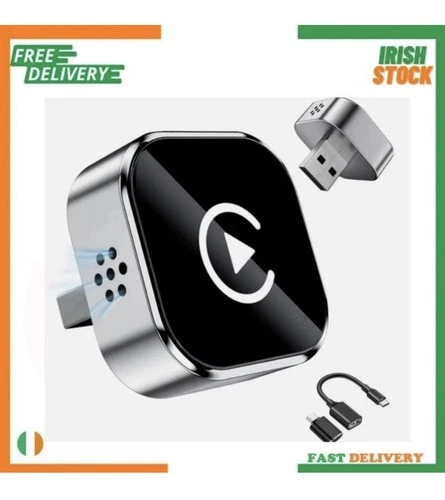
Wireless CarPlay & Android Auto Adapter 2-in-1 USB Plug & Play
€19.99 €23.99 Save 17%
In stock, ready to ship
2-in-1 wireless CarPlay & Android Auto adapter, plug & play USB. Only €19.99 in Ireland — in stock, delivered in 2–4 days across Ireland.
Product description
Wired CarPlay or Android Auto, made wireless in seconds. 2-in-1 Type-A connector
Plug this 2-in-1 adapter into your car's USB port, pair your phone once, and you are done. Fast 5GHz WiFi gives a stable, lag-free connection, with automatic reconnection every time you start the car. No apps, no cables, no fuss — just get in and drive with maps, music and calls on your car display.
Key features:
- 2-in-1 adapter for wireless CarPlay and Android Auto
- Plug-and-play USB setup, pair your phone once
- Fast 5GHz WiFi for a stable, lag-free connection
- Automatic reconnection every time you start the car
Perfect for:
- Daily commuters who drive several times a day
- Short trips where plugging in feels like a chore
- Family cars with both iPhone and Android drivers
- Keeping your phone in your pocket while you navigate
Good to know: your car must already support wired CarPlay or Android Auto for this adapter to work.
Delivered across Ireland in 1-3 working days, including Dublin, Cork, Galway and Limerick. Free delivery on orders over €50.
Carplay Wireless Adapter: With its compact design and 50% reduced size, the ultra-compact, low-profile wireless adapter fits almost flush into the vehicle's USB port and blends seamlessly into the interior. This creates a tidy, minimalist appearance without tangled cables. The original CarPlay can be easily upgraded to a wireless device, so you can enjoy features such as wireless music playback, maps and phone calls.
Compact Design The wireless CarPlay adapter features a miniaturized design, reducing its size by 70%. This ultra-compact, slim wireless adapter fits almost flush with the vehicle's USB port and blends seamlessly into the interior, creating a clear, minimalist aesthetic.
Automatic connection, plug and play: Android car wireless adapter requires no complicated settings. All you need to do is connect your smartphone to the WiFi and Bluetooth of the Android car adapter to use it. Every time the vehicle starts, the connection is automatically restored, so you can enjoy a smooth experience.
Dual Band Peak Performance Our wireless CarPlay adapter uses a 2.4GHz and 5.8GHz dual band chipset, which combines the advantages of both frequency bands, giving you an excellent user experience. Thanks to its comprehensive compatibility, it can be used with a variety of devices and establishes a stable connection even in complex signal environments, so basic functions work smoothly.
Efficient heat dissipation: the ventilation design on the side of the car play adapter ensures a comprehensive improvement of heat dissipation. Precisely designed air ducts achieve optimal air circulation inside and outside the device, creating an efficient heat dissipation system. The stable temperature control not only ensures a smooth experience with every use, extends the life of the device and ensures optimal performance
Wide Compatibility Apple CarPlay wireless adapter is compatible with factory-installed wired CarPlay systems. Supports iOS 10 and above and Android devices with Android 11 and above, and Auto from 2016. Includes both USB-A and USB-C adapters to ensure compatibility with most USB ports in the car.
IMPORTANT NOTE As our adapter is made of metal, it is normal. Solution: After connecting CarPlay, we recommend that you open the Google browser on your smartphone and enter the address 192.168.1.101 to update the system. To maintain a stable connection for the product, visit Google address 192.168.1.101 regularly to update the configuration of the CarPlay adapter.
How to connect Android: The device is factory set to CarPlay. If you want to connect to Android car, you need to manually activate the vehicle's setting switch: 1. Make sure your mobile phone is connected to Bluetooth. 2. Turn on Bluetooth and Wi-Fi on the phone. 3. Search for Bluetooth devices and start pairing. 4. After successful Bluetooth connection, Android Auto is automatically detected and connected.
You may also like
-17%